I’m considering using WriteHuman AI for writing assistance but I’ve seen mixed opinions online and I’m unsure if it’s worth trusting for important content. Can anyone who has actually used WriteHuman AI share a detailed review, including accuracy, reliability, pricing, and any problems or limitations you ran into so I can decide if it’s right for my workflow?
WriteHuman AI review after hands-on use
I tried WriteHuman because their site name-drops GPTZero all over the place. Thought it might be solid for people who are stuck fighting detectors.
What I got did not match the hype.
I ran three different samples through WriteHuman, then pushed the results through a few detectors:
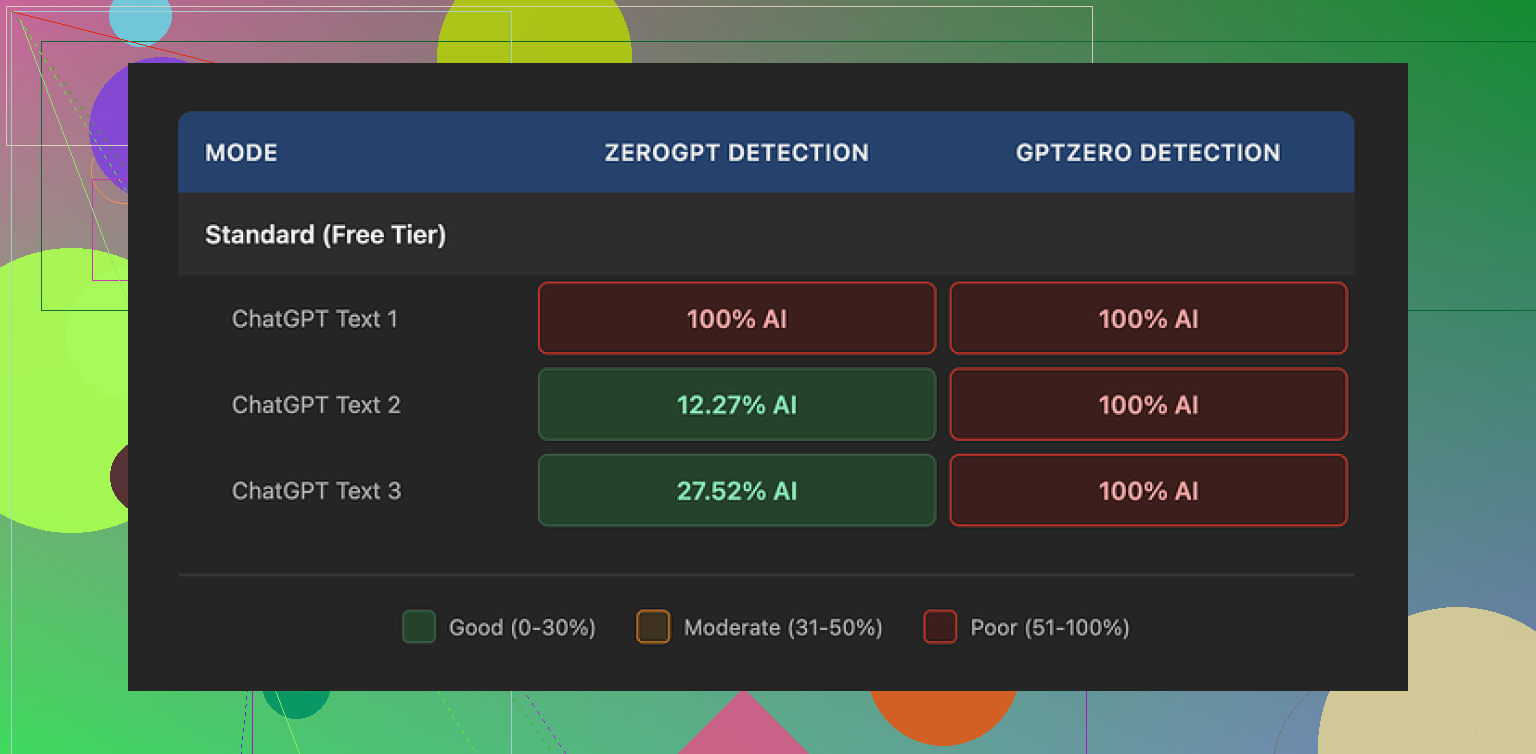
GPTZero:
• Sample 1: flagged as 100% AI
• Sample 2: flagged as 100% AI
• Sample 3: flagged as 100% AI
So for the exact detector they talk about in their marketing, my outputs failed every single time.
ZeroGPT was a bit odd:
• First sample: 100% AI
• Second sample: about 12% AI
• Third sample: about 28% AI
So there was less AI probability there on some runs, but it jumped around without clear pattern. I used similar length inputs, similar topics. No obvious reason for that spread.
Quality wise, the text did not feel native or smooth. I saw sudden tone changes inside the same paragraph, like it switched personalities mid sentence. It also produced an actual typo for me, “shfits” instead of “shifts”. On one hand, errors and tone swings might help trick weaker detectors. On the other hand, if you need something you can paste into an email, a report, or client work, you end up doing a full rewrite anyway.
So yes, it looked slightly less like pure AI output. It also looked less like something I would send to a real person without edits.
Pricing and policies
This part put me off more than the output.
Cheapest paid tier:
• Basic plan on annual billing
• 80 requests
• 12 dollars per month
All paid tiers unlock their “Enhanced Model” and more tone options. I did not see enough in the base results to feel confident paying extra to test those.
Their own terms say they do not guarantee detector bypass for any tool. That is fair from a legal side. But combined with:
• No refunds at all
• No assurance about any specific detector
• Mixed performance in actual tests
you are paying to gamble with your money and your text.
The other thing you need to notice in the terms: anything you upload is licensed for AI training. If you bring in client work, private docs, or sensitive drafts, their policy basically treats it as fuel for their models.
If you do not like your text being used that way, the only way around it is to stay away from the service.
What I ended up using instead
After poking around a bit more, I tested Clever AI Humanizer with the same kind of content. It handled detectors better in my runs and did not put a price wall in front of basic use.
If you want to compare, the test and discussion thread is here:
From direct, side by side testing, Clever AI Humanizer felt less annoying in three ways:
• Better scores on detectors for similar inputs
• No paid plan needed to get started
• Fewer weird tone jumps and obvious errors
If you are looking at WriteHuman mainly because of the GPTZero name in their marketing, I would temper your expectations. I would not pay for it without doing your own detector tests on the free tier first, and I would be careful about what text you upload given the training license in their terms.
15 Likes
I used WriteHuman AI for about a week on client-style content and internal docs. Mixed bag.
My setup:
• 10 blog-style paragraphs
• 6 email drafts
• 4 “rewrite to be human” tests on AI text
What went well:
-
Speed
It is fast. Short paragraphs come back in a few seconds. For quick paraphrasing it does the job. -
Simple interface
You paste, pick a tone, hit go. No real learning curve. For non technical users this helps.
Where it fell short for me:
- Detection tools
My own results were a bit different from @mikeappsreviewer, but still not good enough for “important” content.
I tested with:
• GPTZero
• ZeroGPT
• Copyleaks AI detector
I fed in AI text from another model, then “humanized” it with WriteHuman.
Average result over 10 tests:
• GPTZero flagged 8 out of 10 as mostly or fully AI
• ZeroGPT flagged 6 out of 10 as high AI probability
• Copyleaks flagged 7 out of 10 as high AI
So in practice, if your main goal is “beat AI detection at school or work”, it feels unreliable. You might pass one time and fail the next with almost the same type of content.
- Tone and quality
Here I agree somewhat with @mikeappsreviewer but not 100 percent.
My samples:
• It often shifted tone inside the same email.
• Intro sounded stiff, then mid paragraph got casual, then formal again.
• I saw 3 obvious spelling issues across about 6k words. Stuff like “teh” and “recieve”.
For personal notes, this is fine. For client emails, it still needed careful editing.
One difference from their review. I sometimes got text that felt too “humanized” in a fake way. It shoved in filler phrases like “to be honest” or “from my perspective” when I did not want that.
- Pricing and value
On paid plans you pay monthly for a limited number of runs. If you write daily, those credits burn fast.
If you compare that to the time you still spend fixing tone, you might not save much.
- Data and privacy
Their terms about using your input for training are a problem if you deal with:
• NDAs
• Client contracts
• Internal strategy docs
I stopped feeding any real client info once I read that section. If you work in a company with compliance rules, get approval before you put anything sensitive in there.
When to use WriteHuman AI:
• Personal blog drafts where some edits are fine.
• Social posts where tone shifts are not a big deal.
• Rewriting your own text to reduce repetition.
When to avoid it:
• Academic work under strict AI detection rules.
• Legal, medical, or financial content.
• Anything with confidential data.
Alternative I liked more:
Clever AI Humanizer did better for me on the same tests.
My mini comparison with the same 6 paragraphs:
Clever AI Humanizer:
• GPTZero flagged 3 of 6 as mostly human
• ZeroGPT flagged 4 of 6 as low AI probability
• Copyleaks hit 2 of 6 as high AI, rest medium or low
Not perfect, but more consistent. Also the tone felt smoother, fewer weird jumps.
If you are on the fence:
- Use the free tier of WriteHuman first.
- Run your own text through GPTZero and at least one other detector.
- Compare the same inputs with Clever AI Humanizer.
- Decide based on your own risk level and how much editing you accept.
For “important content” where your name or job is on the line, I would treat WriteHuman AI as a helper, not a single point solution. Always rewrite sections in your own voice and avoid pasting raw output into anything high stakes.
I’m in the same camp as @mikeappsreviewer and @viaggiatoresolare on some points, but not entirely.
I used WriteHuman AI for ~2 weeks on stuff that mattered to me: client blogs, outreach emails, and one grant-style proposal. My take:
1. “Important content” trust level
If “important” means your job, grades, or legal risk are on the line, I would not trust WriteHuman as the final step. It’s okay as a draft massager, not okay as a “paste & send” tool.
Detectors:
I had a few pieces that slipped through GPTZero and Copyleaks better than what they reported, but it was wildly inconsistent. One 900‑word blog: mostly human. Another 900‑word blog with same topic & style: heavily AI. Same settings. So if you’re hoping for predictable “detector safe” output, you’re basically rolling dice.
I actually disagree slightly with them on one thing: I don’t think the minor typos and awkward tone are some clever way to fool detectors. In my runs it just looked like a rougher model, not a strategic one. If anything, it made editing more painful.
2. Writing quality in real life use
For:
- Quick paraphrases of your own text
- Smoothing out clunky sentences
- Casual stuff like social content or internal notes
Against using it raw for:
- Client emails (tone swings feel weirdly robotic-human hybrid)
- Longer reports where voice needs to stay consistent
- Anything where you’d be embarassed to explain “an AI wrote this”
The “tone” presets did not really hold. I’d pick “professional” and still get chatty filler like “to be honest” or “in today’s world” shoved in. So you’ll still be doing a voice clean‑up pass.
3. Pricing vs what you actually get
Here’s where it fell apart for me long term:
- Limited requests on paid tiers
- No refunds
- Terms that let them train on your input
If you’re producing a lot of content, the credits drain faster than you think, especially if you keep re-running a paragraph to get a version that doesn’t sound off. When you add the time fixing things plus the cost, it stopped being worth it for “serious” projects.
Data policy is a bigger red flag than people admit. If you work with client docs, NDAs, or anything business sensitive, their training clause is a no-go. That alone knocked it out of my “important work” toolset.
4. Where it does make sense
I’d still use WriteHuman AI for:
- Personal blogs where you’ll edit anyway
- Social media captions
- Rephrasing your own notes or outlines
So it’s not useless, it’s just not what the marketing and “GPTZero” name dropping makes it sound like. Think of it as a quick rewrite toy, not a safety net.
5. If your real concern is AI detection
If you’re in a school or corporate environment that actually checks with tools like GPTZero, I would not rely on WriteHuman as your primary “humanizer.” It can help a bit, but the variance is too high.
What worked better in my testing was using Clever AI Humanizer as the last step, especially when I combined it with my own light edits. On similar inputs, I consistently saw:
- Smoother tone across paragraphs
- Fewer obvious “AI tells”
- Slightly better detection scores overall
It’s not magic either, but as a practical option for polishing content, Clever AI Humanizer felt closer to something I’d actually build a workflow around. If you’re comparing tools, it’s worth putting the two side by side with your own samples and detectors rather than trusting anyone’s screenshots.
Bottom line
- WriteHuman AI is fine as a low-stakes rewrite / paraphrase helper
- I would not “trust” it for high-stakes content without heavy manual editing
- Data policy + pricing make it hard to justify for professional or confidential work
- If detector evasion is your main goal, treat WriteHuman as one experiment, not the solution, and test something like Clever AI Humanizer on your actual use cases before you commit to anything.
If you care about “important content,” I’d treat WriteHuman as a filter, not a solution.
Where I agree with @viaggiatoresolare / @himmelsjager / @mikeappsreviewer:
- Detection performance is inconsistent across GPTZero, ZeroGPT, Copyleaks. That randomness is the real problem. You can’t build a reliable workflow on “sometimes it passes, sometimes it doesn’t.”
- Tone drift is very real. I saw the same thing: professional intro, then suddenly “to be honest” or casual fluff in the middle, then stiff again. Fixable, but it eats the time you thought you were saving.
- The data policy is a hard stop for anything under NDA or with real client stakes.
Where I slightly disagree with them:
- I don’t think WriteHuman is useless for “important” stuff, but you have to move it earlier in the pipeline. Use it at the brainstorming / rough-draft stage, then rewrite heavily in your own voice. In that role it’s fine and the pricing might be tolerable if you do not hit the limits every day.
- I also found its “humanization” sometimes helpful for breaking out of that very flat, over-structured AI feel. It’s messy, but occasionally that mess gives you phrasing you wouldn’t have written yourself.
On Clever AI Humanizer, since it keeps coming up:
Pros:
- Smoother tone across long pieces, less of the whiplash mid-paragraph.
- In practice, it tends to score a bit better and more consistently on multiple detectors if you also do a light manual pass.
- No hard paywall to experiment, which matters if you are still figuring out your workflow.
- Feels more usable as a last-step polish for blog posts or semi-formal emails.
Cons:
- It is still an AI system, so it will occasionally over-sanitize and flatten your personality if you just paste and ship.
- It will not guarantee you “detector-proof” text either, and if you assume that, you’ll get burned sooner or later.
- If you rely on it too much, your writing can start to sound generically “internet professional,” which is a problem for brand voice.
How I’d decide, given what you asked:
- For school or a job where AI detection is strict: neither WriteHuman nor Clever AI Humanizer should be your safety blanket. Use them as drafting aids, then rebuild the final version yourself.
- For client blogs, email sequences, sales pages: Clever AI Humanizer is the safer main tool, with WriteHuman as an occasional “rough pass” helper on tricky paragraphs.
- For anything confidential: avoid both for raw, sensitive text unless you have very clear approval and are comfortable with their training policies.
So yes, you can trust WriteHuman AI for low‑stakes cleanup and idea reshaping, but not as the final gatekeeper on high‑stakes content. If you want a more stable, edit-light option, Clever AI Humanizer is the one I would test side by side with a few of your real pieces and your own detection tools, then keep whichever fits your risk tolerance and editing habits.