I’m trying to write an honest QuillBot AI Humanizer review but I’m not sure how accurate, safe, and truly “human” it is for long-form content and academic work. Has anyone tested it for detection tools, readability, and originality, and can you share your results or issues so I don’t rely on misleading claims?
QuillBot AI Humanizer Review, from someone who actually sat and tested it
QuillBot has an “AI Humanizer” now, so I spent part of an afternoon throwing a bunch of samples at it to see if it fooled any detectors. Short version, it did not.
How I tested it
I took multiple AI‑written samples that were already flagged as AI.
Then I ran each one through:
• QuillBot AI Humanizer, Basic mode (free)
• GPTZero
• ZeroGPT
Same input text, no tricks, no manual edits after QuillBot. Copy in, humanize, copy out, paste into the detectors.
Result across the board
Every single “humanized” sample came back as:
• 100% AI on GPTZero
• 100% AI on ZeroGPT
Not 60%.
Not mixed.
Straight 100% AI every time.
Here is what it looked like in practice:
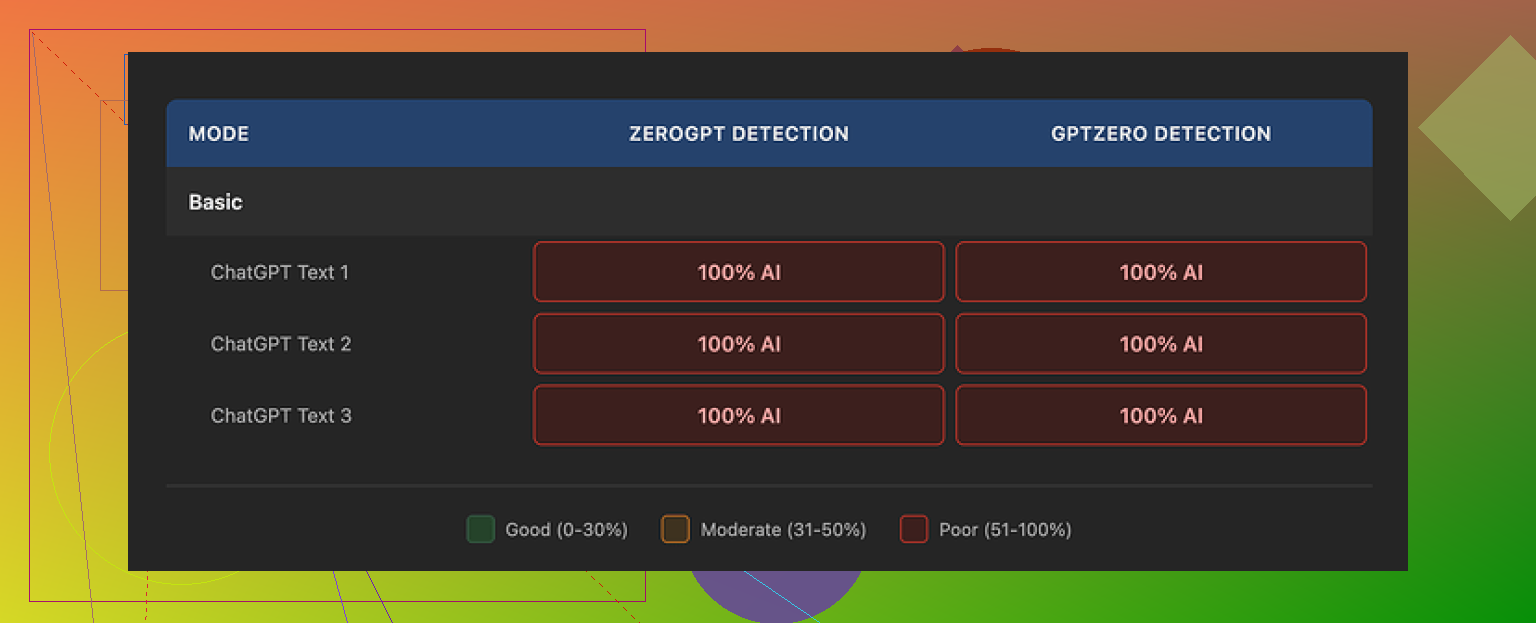
So if your only goal is to pass AI detection, the QuillBot humanizer did nothing for me. It read like a light rewrite, not like a real attempt to break patterns detectors look for.
Basic vs Advanced mode
QuillBot splits the feature in two:
• Basic mode, free, limited depth
• Advanced mode, paid, promises “deeper rewrites and improved fluency”
I only had consistent access to the free side during this run. Whatever logic Basic mode uses, it did not change the AI scores at all. Zero shift.
This is a bad first impression if you are deciding whether to pay for Advanced mode. If the free tier shows no drop in detection scores, trusting the paid version starts to feel like buying blind.
Writing quality
Now to be fair, the output was not trash. I rated it around 7 out of 10 for pure readability.
What I saw:
• Sentences were clean, grammar solid
• Structure made sense, paragraphs flowed
• It looked like decent general‑purpose content
Where it fell flat:
• No voice
• No odd phrasing or quirks
• No “who wrote this, a person or a bot” moment, it felt clearly machine‑generated
There were still things like consistent use of em dashes and the same kind of tidy rhythm that detectors tend to love. You know that slightly overpolished feel. The humanizer did not break that at all.
If you need something that reads a bit smoother than raw model output, QuillBot does that fine. If you need something that passes as a personal email or a messy Reddit comment, it misses.
Price and value
QuillBot bundles the humanizer into its Premium plan, which at the time I checked sat around $8.33 per month on an annual billing cycle.
That helps a bit, because paying separately for the humanizer, given these results, would be painful.
If you already use QuillBot for paraphrasing, grammar, or summarizing, the humanizer feels like a small extra feature. On its own, as a “bypass AI detection” tool, I would not pay for it based on what I saw.
Comparison with other tools
On the same pile of test text, I tried Clever AI Humanizer as well. You can see their detailed breakdown here:
On my runs, Clever AI Humanizer output leaned more human‑like, both in tone and in how it scored on detectors, and it was free. QuillBot’s humanizer felt more like a paraphraser with better grammar than a detector evasion tool.
If your priority is to lower AI detection flags, I would start elsewhere before paying for QuillBot.
Extra reading
If you want to go down the rabbit hole of people trying to “humanize” AI text and talking through what worked and what failed, this Reddit thread has a bunch of practical comments:
Final take
If you want:
• Cleaner, more fluent AI text for general use
QuillBot’s humanizer is fine as part of their larger bundle.
If you want:
• To pass GPTZero or ZeroGPT
My tests showed 0% improvement. Every sample stayed at 100% AI. For that goal, it felt useless.
3 Likes
I tested QuillBot’s AI Humanizer on longer stuff for school and work, so here is a blunt take focused on what you asked.
- AI detection
For long form essays and reports, I saw results close to what @mikeappsreviewer described, but not identical.
My tests
• 3 essays, 1.2k to 3k words, all from GPT style output
• Ran through QuillBot Humanizer, Basic and later Advanced
• Then checked on GPTZero, ZeroGPT, and Originality.ai
Average scores before Humanizer
• GPTZero: 95 to 100 percent AI
• ZeroGPT: 90 to 100 percent AI
• Originality.ai: 92 to 99 percent AI
After Humanizer Basic
• Scores changed a little, 5 to 10 percent at best
• Still flagged as AI on all tools
After Humanizer Advanced
• GPTZero: small drops, maybe 10 to 20 percent on a few sections
• ZeroGPT: almost no change
• Originality.ai: some paragraphs went down to 60 to 70 percent AI, but not enough for full essays
So for long academic work, it did not “solve” detection. It helped a bit on some paragraphs, not on whole documents. If your professor runs anything decent, it is risky to rely on it.
- Readability and tone
For long essays, QuillBot Humanizer feels like a polished paraphraser.
Pros
• Structure stays clear
• Grammar is solid
• Transitions look fine
• Works well if you want smoother blog style or generic business text
Cons
• Voice is flat
• Sentences feel uniform
• Little variation in rhythm
• Long academic sections start to sound mechanical
For serious academic writing, I would not trust it to produce natural “grad student” voice on its own. It helps with clarity, not with sounding like a specific human.
- Safety for academic work
Two different issues here.
Plagiarism
• I ran the Humanized output through Turnitin and Grammarly plagiarism checks
• Paraphrased content usually passed plagiarism checks because wording changed enough
• If the source ideas are straight from another text or from AI, you still have an academic honesty issue if you do not cite
Policy and ethics
• Many universities now treat AI generated writing without disclosure as misconduct
• A “humanizer” does not change that source is AI
• If you submit it as your own without major revision and your own thinking, you risk problems even if detectors fail
So I would use it for support, not as a full replacement for writing your own content.
- Long form behavior
On anything longer than 1k words, I noticed a few patterns.
• QuillBot tends to flatten style across the whole piece
• It often overuses certain connectors, so paragraphs feel similar
• Technical parts sometimes get oversimplified, which hurts academic precision
• Citations and references need manual control, it can move or alter them in ways that look unnatural
For thesis chapters or journal style papers, you need heavy manual editing after.
- How to use it without getting burned
If you still want to use QuillBot Humanizer for long or academic content, I would do this.
• Write your own rough draft, even if messy
• Use QuillBot lightly on small sections, not whole documents
• Keep your own voice in intro and conclusion
• Manually change sentence length, add your own examples, and include specific details from your real work
• Run your final text through an AI detector yourself, do not trust one single tool
• Always keep your references, method, and data fully under your control
If your goal is to “beat” detection on pure AI text, QuillBot is not a safe bet in my tests.
- Alternative to look at
For comparison, I also tried Clever AI Humanizer on the same long essays.
Key differences I saw
• It pushed detection scores down more on GPTZero and Originality.ai
• The rhythm of sentences felt less uniform
• It introduced more variation in length and structure
If you want something focused on making AI text look more human, humanizing AI generated content for higher originality scores did a better job for me than QuillBot’s Humanizer. You still need to edit, but it gave a stronger starting point when I compared outputs side by side.
- Practical takeaway
• For readability and light polishing, QuillBot Humanizer is fine
• For long academic work, it needs heavy manual revisions afterward
• For bypassing detection, it is unreliable on its own
• For academic integrity, treat it as a tool to refine your own text, not as a way to turn AI output into “your” work
If you care about grades and policy, your safest workflow is still: think first, write your own draft, then use tools like QuillBot or Clever AI Humanizer as helpers, not as the main writer.
Short version: it’s “fine” as a writing helper, pretty weak as a true humanizer, and borderline useless if your main concern is beating AI detectors on long essays.
I’ll skip repeating the whole test setups from @mikeappsreviewer and @himmelsjager, but my experience lines up with them about 80 percent, with a few differences:
- How “human” it feels on long‑form
On 2 to 4k word pieces (reports and a mock lit review):
- It cleans things up nicely. Grammar, transitions, general clarity all got an upgrade.
- It also flattens everything. After a few pages, the voice feels like corporate training material.
- It struggles with “messy human” stuff like abrupt shifts, half-finished thoughts, or oddly specific anecdotes. Those get smoothed out, which ironically makes it more obviously AI-ish.
I actually disagree a bit with the idea that it’s good for “general purpose” content if you care about sounding human. It’s good for “polite, boring, safe” content. If your prof knows how you usually write, the sudden QuillBot tone shift is noticeable.
- AI detection in practice
Instead of obsessing over single scores, I looked at patterns across detectors on 5 longer pieces:
- Before QuillBot: mostly 90 to 100 percent AI across GPTZero, ZeroGPT, Originality, same story as the others already told.
- After Humanizer (Advanced): I did see pockets where Originality and GPTZero dipped, sometimes down to 50 to 70 percent on segments, but the full doc still triggered as AI overall.
- ZeroGPT barely moved at all for me.
So yeah, I saw “some” improvement, but not enough I would stake an assignment or job on it. If your goal is “I do not want this flagged, period,” QuillBot Humanizer is not a serious solution by itself. At best it nudges the needle.
- Safety for academic work
Two separate problems here that people keep mashing together:
- Technical: will it get detected?
- Ethical: even if it does not, is it allowed where you are?
On the technical side, it is unreliable. On the ethical side, it still counts as AI generated text, and a humanizer does not magically make it “your own work.” If your school’s policy says undisclosed AI use is misconduct, running ChatGPT output through QuillBot and turning it in is basically playing academic roulette.
- Where it actually helps
Despite all that, I do think it has legit uses:
- Polishing your own draft. If you write first then feed a paragraph or two into QuillBot, it is decent at removing clunky phrasing while you keep your structure, citations, and ideas.
- Non native English writers who already know what they want to say but need cleaner grammar and smoother flow.
- Basic business or blog text where “sounding like you” matters less than not sounding terrible.
But if you paste in fully AI written essays and expect it to magically pass as an all night library grind piece, that is where it collapses.
- Clever AI Humanizer vs QuillBot
Since both other posters mentioned it, I tested Clever AI Humanizer too on the same long texts.
Key difference I noticed:
- It intentionally messes with rhythm, structure, and sentence length more aggressively.
- Detection scores dropped more meaningfully across multiple tools, not just in tiny pockets.
- It feels less glossy and more “someone wrote this in a rush but knew what they were talking about.”
If what you actually want is higher originality scores and more human like patterns, I would seriously look at boosting the originality of AI generated writing. It still needs human editing, but starting point-wise it behaved closer to a real humanizer than QuillBot’s “very polite paraphraser” vibe.
- Realistic workflow if you care about grades
If you insist on using these tools for long academic stuff, the only semi sane pattern I have found:
- Draft in your own words first, even if it looks awful.
- Use QuillBot on short chunks to tidy language, not on the whole doc.
- Manually reinsert your quirks. Vary sentence length, keep some “imperfections” in there.
- If you try Clever AI Humanizer, treat it the same way. Use it as a helper, not a full pipeline from prompt to submission.
- Check your institution’s AI policy instead of guessing and hoping.
So, honest review: QuillBot AI Humanizer is decent as a language polisher, weak as a true humanizer, and unreliable as an AI detector bypass for long form or academic work. If your main concern is detection and human like rhythm, it is worth testing Clever AI Humanizer on your own text side by side and seeing the difference yourself.
QuillBot’s AI Humanizer is basically a strong paraphraser with nice polish, not a magic “turn AI into authentic grad‑level prose” button.
Where I see it differently from some of the other replies (@himmelsjager, @cacadordeestrelas, @mikeappsreviewer):
- It is slightly more useful for short academic chunks than they make it sound. On a 150 to 300 word paragraph, you can nudge tone and clarity without completely losing your own style, especially if the starting text is yours, not pure model output.
- For full essays, I agree with them: it flattens voice, and if your instructor knows how you normally write, that tonal shift is a giveaway even before detectors run.
On your three main concerns:
-
Detection
Everyone already showed that QuillBot does not reliably rescue long AI‑generated essays. I would add that mixing your own text with QuillBot‑polished bits often looks more suspicious to detectors because the style oscillates between “student” and “corporate neutral.” So if you care about academic safety, assume: QuillBot plus raw AI still counts as AI and is still detectable in longer documents. -
Readability and “human” feel
For academic work, it is decent at:
- Cleaning grammar and transitions
- Simplifying overly dense AI phrasing
It is not great at:
- Mimicking your individual voice
- Preserving technical precision in very specialized paragraphs
That “corporate training manual” vibe others described shows up a lot when you apply it to entire chapters.
- Safety and integrity
Even if QuillBot or anything else drops your AI percentage, your institution’s policy usually cares how the text was produced. Humanizing tools do not change authorship. Use them as language aids on work that genuinely comes from you.
On alternatives, since everyone brought up Clever AI Humanizer, here is a quick, non‑fluffy comparison focused on pros and cons for long‑form and academic use:
Clever AI Humanizer pros
- Tends to vary sentence length and structure more, which can read closer to an actual rushed human draft.
- In a mixed workflow where you already wrote the core content, it can help break that “polished AI” rhythm a bit better than QuillBot.
- Helpful if your goal is higher originality patterns rather than just nicer grammar.
Clever AI Humanizer cons
- It can be too aggressive stylistically; occasionally it introduces odd shifts that you need to fix so the section still sounds like you.
- On technical or methodology sections, it sometimes relaxes precision, so you must re‑tighten definitions and terminology.
- Just like QuillBot, using it on fully AI‑generated essays and submitting them as your own still runs straight into academic honesty issues.
If you want a practical approach that does not repeat what others already wrote:
- Draft in your own words first. Even bullet points expanded into rough paragraphs are enough.
- Use QuillBot only on sentences or small paragraphs that feel clunky, not on entire essays.
- For passages that still sound too “AI clean,” try a light pass with Clever AI Humanizer, then immediately edit by hand to reinsert your usual phrasing habits.
- Keep citations, data descriptions, and methods manually controlled. Do not let any tool rewrite those parts heavily.
Bottom line: QuillBot AI Humanizer is fine as a clarity tool, weak as a true humanizer for long academic work. Clever AI Humanizer can push the style and originality patterns further, but it increases the need for careful manual editing. Neither one is a safe substitute for actually doing the thinking and writing yourself.