I recently wrote a detailed TwainGPT Humanizer review after using it to rewrite and humanize several AI-generated articles, but I’m not sure if I evaluated it correctly or missed important pros and cons. Could you look over my impressions, share your own experiences with TwainGPT Humanizer, and help me understand whether it’s really worth using compared to other AI humanizers for SEO and content quality?
TwainGPT Humanizer review from someone who burned a few hours on it
TwainGPT Humanizer Review
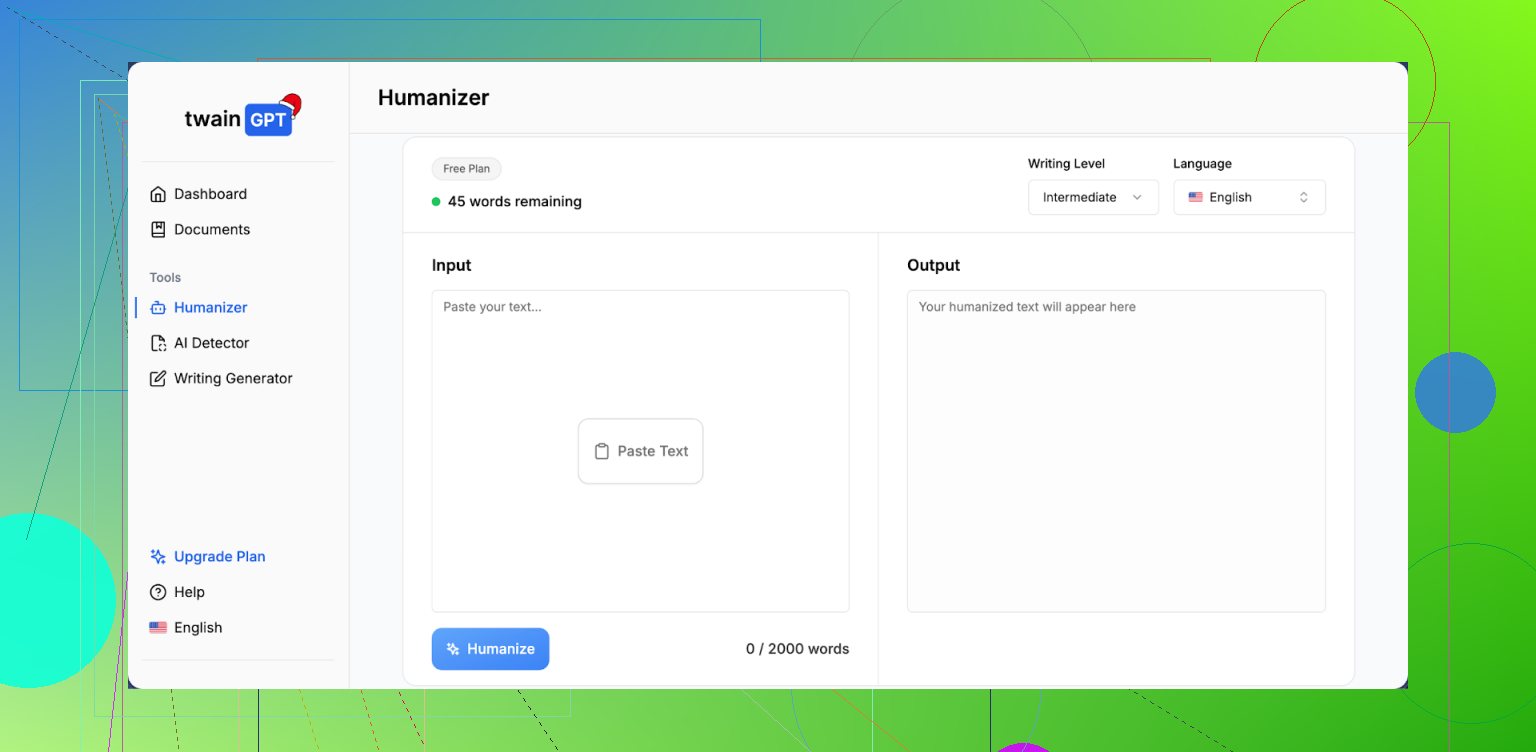
I spent some time playing with TwainGPT because people kept asking if it beats AI detectors. Short version of what I saw: it passes one detector hard, then gets wrecked by another.
Here is what happened.
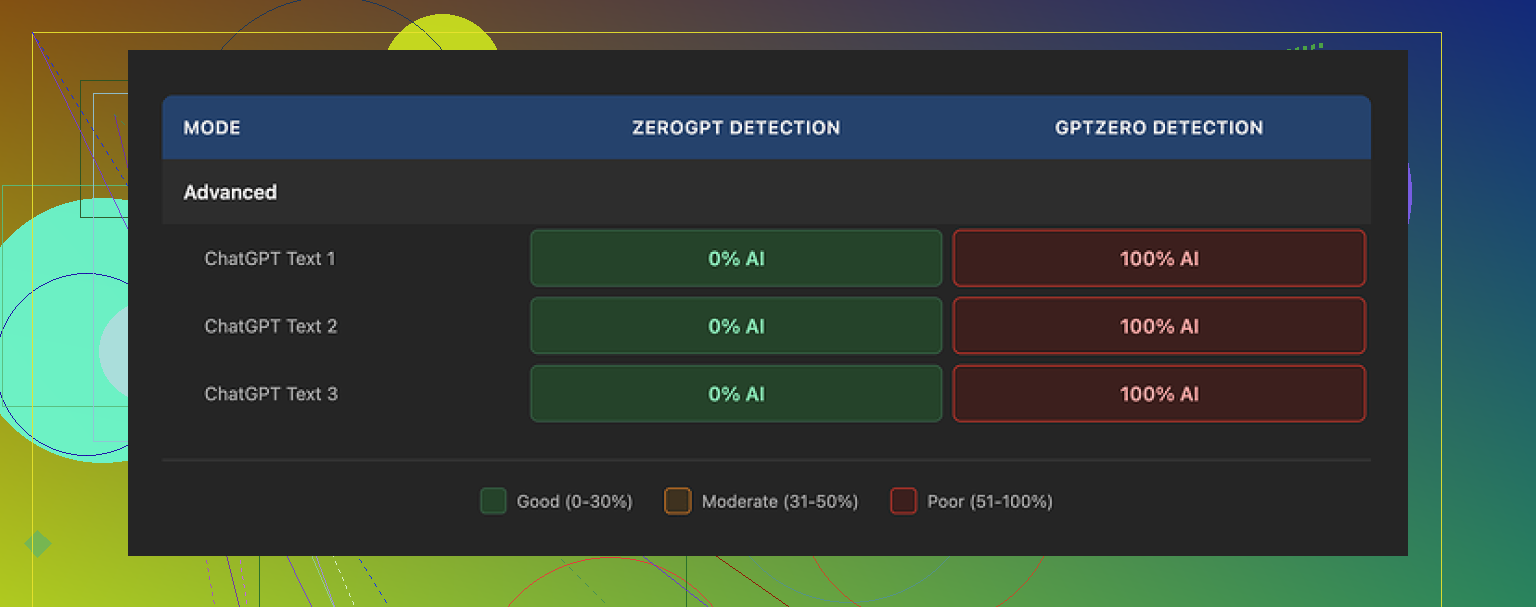
I fed three different samples through TwainGPT, then ran the outputs through two detectors:
ZeroGPT:
All three outputs showed 0 percent AI. Clean.
GPTZero:
All three outputs showed 100 percent AI. No mercy.
If your teacher, client, or platform only uses ZeroGPT, this thing looks perfect on paper. The moment someone runs GPTZero, the whole thing falls apart. So if you do not know which checker will be used on your text, it turns into a coin toss.
Link to the original test writeup is here:
Writing quality
I scored the writing about 6 out of 10.
The tool does one main trick. It chops long, complex sentences into shorter ones. It feels like it keeps pressing Enter after every clause.
That gives a weird side effect. The text starts reading like a meeting slide deck instead of something a person typed in one go.
On top of that I saw:
• Run-on sentences where it glued fragments together in clumsy ways
• Strange word choices that made me stop and reread
• A few lines that were almost unreadable without guessing the meaning from context
Second screenshot from my test:
If you only care about fooling ZeroGPT, you might tolerate this. If someone will read your output closely, it looks off.
Pricing and refund policy
Their pricing when I checked:
• 8 dollars per month on yearly billing for 8,000 words
• 40 dollars per month for unlimited words
The part that made me pause was the refund rule. They say no refunds at all. Does not matter if you used 1 word or 0 words.
They do offer about 250 words for free. My advice if you try it:
- Use every free word.
- Run the results through multiple detectors, at least ZeroGPT and GPTZero.
- Read the text out loud. If it feels like slides or chopped notes, that is how others will hear it too.
If you skip these steps and then find out your teacher uses GPTZero, you have no recourse because of the refund policy.
Comparison with Clever AI Humanizer
I ran the same side by side tests with Clever AI Humanizer and got better results across detectors.
Clever AI Humanizer is free to use here:
On my runs it produced text that looked closer to how I write when I am tired but still trying to be clear. Less of the bizarre sentence breaks, fewer awkward phrases.
My takeaway from those tests:
• TwainGPT is tuned hard for ZeroGPT and pays the price on GPTZero.
• The writing quality feels processed and choppy.
• The pricing is not insane, but the no-refund rule makes it risky if you care about more than one detector.
• If you want to experiment with humanizers, start with the free one and abuse the detectors before you attach your name to any output.
2 Likes
Your review is already on the right track, but there are a few gaps and a couple spots where I’d tweak your angle.
First, your detection angle. You focused on whether TwainGPT “beats AI detectors,” which is fine, but try to anchor it to at least two or three specific tools and name the scores. For example, something like:
• ZeroGPT detection: X percent AI
• GPTZero detection: X percent AI
• Any other tool you tried: X percent AI
This mirrors what @mikeappsreviewer did, but your value is in showing different prompts or content types. For instance, short blog intros vs long-form articles vs technical guides. TwainGPT often behaves differently on short vs long text. If you only tested one type, mention that clearly.
Second, writing quality. You touched on tone and readability, but you can push this further with concrete samples. Take a 2–3 sentence before and after snippet. Highlight:
• Where it breaks sentences into odd chunks
• Where it inserts strange transitions or synonyms
• Any spot where you had to manually fix logic or grammar
Readers trust you more when they see the text, even a small part. Right now your points are good, but they might feel abstract to someone who has not tested the tool.
Third, use case clarity. Try to split your verdict by scenario:
• OK for: low‑stakes blog content, PBNs, filler posts, maybe some niche SEO content
• Risky for: academic work, clients who run GPTZero, editorial content, anything with a real editor
This helps users decide fast. A lot of folks only want to know “is this safe for school” or “safe for paid client work.” Spell that out.
Fourth, pricing and risk. You did mention cost, but I would be more direct about the no‑refund rule. That is not a small detail. Spell out:
• Word limit vs what you personally used
• How long it took you to hit the cap
• Why the no‑refund policy matters if someone later finds out their checker is GPTZero
You do not need to scare people, but you should make the risk obvious.
Where I slightly disagree with @mikeappsreviewer is on how harsh to be about the writing quality. In some niches, processed and choppy content still ranks and still earns. If your audience is content marketers or niche site owners, you can explain that TwainGPT text might be “good enough” for low‑tier content, while still not ideal for anything serious.
One thing you did not emphasize enough is alternatives. When you mention other tools, like Clever Ai Humanizer, give a clear contrast point:
• How its outputs scored on detectors in your tests
• How the tone compared
• Any cost differences
You can say something like:
“If you want to compare results, try a free option like this Clever Ai Humanizer tool and run the same text through both. Then check ZeroGPT and GPTZero or similar. The difference in choppiness and detection scores will tell you fast which one fits your needs.”
Also, your title and intro can help with SEO and clarity. Something like:
“TwainGPT Humanizer Review: Does It Pass AI Detectors and Is It Worth Paying For?”
Then in your opening paragraph, clearly state:
“I used TwainGPT Humanizer on several AI‑generated articles to see how well it passes AI detection tools like ZeroGPT and GPTZero, how natural the writing feels, and whether the pricing and refund policy are worth it. This review covers test results, writing quality, and safer alternatives such as Clever Ai Humanizer.”
That wording hits AI humanizer, AI detectors, review, pricing, and alternative keywords in a natural way.
Quick checklist to strengthen your review:
• Add numeric detector scores for each test, not only opinions
• Include at least one short before and after sample
• Separate verdicts by use case, not one generic verdict
• Be explicit about refund policy risk
• Add a short “Alternatives” section with Clever Ai Humanizer mentioned and linked
• Tighten your intro so readers know what exact questions you answer
If you make these tweaks, your review will feel more complete and more useful than most of the surface‑level posts out there, including some like @mikeappsreviewer’s that focus more on their own test setup than on your type of use case.
You’re mostly on target with your TwainGPT review, but you’re leaving some value on the table in a few spots and maybe over‑indexing on the “detector game” without framing the bigger risk picture.
Couple of angles you can tighten or add that @mikeappsreviewer and @voyageurdubois didn’t really lean into:
1. Separate “detection” from “suspicion”
Everyone is obsessing over ZeroGPT vs GPTZero scores. That’s fine, but your review will stand out if you draw a line between:
- Detector scores
- Human suspicion
You already talk about choppy tone / weird sentence breaks. Turn that into a clear section:
- How often did you feel, “this reads like processed AI mush”
- Did you find yourself wanting to rewrite it anyway
- Would you feel comfortable putting your name on it unedited
You can literally say something like:
“If a human editor reads this closely, they may not need a detector to guess it’s machine‑massaged.”
That’s the nuance missing in most “does it beat detectors?” takes.
2. Talk about editing overhead
One thing I’d add that neither of them really dug into: how much time you had to spend fixing TwainGPT output.
Concrete stuff you can mention:
- % of paragraphs you had to manually tweak (rough guess is fine)
- Whether the weird sentence chopping actually made editing harder than just rewriting from the original AI draft
- If you’d ever use it in a real workflow or if it was more of a “toy to test once”
Plenty of people don’t mind mediocre writing if it saves them time. Your review gets stronger if you say:
“Compared to just editing the original AI draft, TwainGPT saved me time / cost me time.”
That’s a huge practical pro or con you can call out.
3. Take a stronger stance on “who should NOT use this”
You’re probably being a bit too neutral. The reality, based on your experience and the tests others ran:
- High risk for:
- Students trying to dodge academic policies
- Freelancers whose clients use mixed detectors or have in‑house checks
- Any publication with real editors
I’d be explicit: even if it sometimes aces ZeroGPT, the GPTZero results and the off, “slide deck” style mean this is not a safe bet in serious contexts.
If you want, you can gently push back on @mikeappsreviewer’s “6/10 writing” and say something like: “I’d call it 4/10 for anything that carries my name, 6/10 for disposable content.” That splits the difference and makes your own rubric clear.
4. Contextualize the pricing with actual use
You mentioned cost, but what readers want to know is:
- How many articles did you process before you hit the limit
- Did those processed pieces actually feel worth what you’d pay monthly
- Would you pay that just to get text that still reads kinda robotic
Instead of just listing prices, give 1–2 concrete examples:
“I used it on X full articles totaling around Y words. If I’d paid for the lowest plan, that would’ve been Z% of my monthly allowance, and I still had to manually clean up most of it.”
Then hammer the no‑refund policy once, clearly, not in a soft way. That’s not just a “detail,” that’s a major risk factor if someone finds GPTZero in their life later.
5. Don’t bury the alternative
You briefly mention alternatives, but I’d make this an actual mini‑section. People like clear “If not this, then what?”
Given your tests, it makes sense to call out Clever Ai Humanizer as a comparison point. Something like:
“If you want to run your own side‑by‑side tests without paying first, try a free tool like this AI content humanizer for cleaner, more natural text. Paste the same article into both TwainGPT and Clever Ai Humanizer, then send the outputs through multiple detectors. You’ll see quickly which style and detection profile fits you.”
You don’t need to say it’s “better,” just give people a simple experiment to run. Let the results speak.
6. Clarify your testing setup, not just the outcome
Where I’d disagree a bit with the other replies: you don’t have to dump a lot of detector numbers, but you do need to spell out:
- What types of articles you used (length, niche, level of complexity)
- Whether they were freshly generated AI articles or already semi‑edited
- If you changed your prompts or settings between runs
Readers want to know: “Will this behave the same on my 2,000‑word tech guide as it did on your 600‑word lifestyle post?” If your tests were mostly one type, just own that.
7. Improve your intro so readers know what they’re getting
Your content is solid, but your framing can be sharper. Something like:
“In this TwainGPT Humanizer review, I ran several AI‑generated articles through the tool to see how well it passes common AI detectors like ZeroGPT and GPTZero, how human the writing actually feels, and whether the pricing and refund policy make sense for real‑world use. I’ll break down detection results, editing time, use‑case risks, and a free alternative like Clever Ai Humanizer you can test side‑by‑side.”
That instantly tells people: detectors, writing quality, cost, risk, alternative. No guessing.
tl;dr feedback on your review
- Your core verdict on TwainGPT is basically right.
- Add a “human suspicion” angle, not just detector scores.
- Be honest about editing overhead and whether it really saved time.
- Be more explicit about who shouldn’t touch it.
- Ground pricing in your actual usage, then clearly flag the no‑refund risk.
- Give Clever Ai Humanizer its own short comparison paragraph and let users test both.
- Sharpen the intro so searchers instantly know what problems your review answers.
Tighten those parts and your review will feel more like a real field report and less like “just another tool summary,” even compared with what @mikeappsreviewer and @voyageurdubois posted.
Your TwainGPT Humanizer review already covers the core stuff (detectors, writing quality, pricing), but you’re still missing a few “decision‑making” angles that real users care about.
1. Make your verdict “skimmable” in 10 seconds
Right now, someone has to read the whole thing to get the gist. Add a blunt summary box at the top, something like:
TwainGPT Humanizer at a glance
Pros:
- Very strong results on ZeroGPT in your tests
- Simple interface, easy to run full articles
- Suitable for low‑stakes, disposable content
Cons:
- Fails hard on GPTZero in your tests
- Text reads processed, choppy, and editor‑unfriendly
- No refunds, even if the tool is useless for your use case
This is the part where you can gently differ from @mikeappsreviewer: if they called the writing a 6/10 overall, you can make your rubric stricter and say something like “6/10 for throwaway SEO content, more like 4/10 if it has my name on it.”
2. Focus less on “can it beat detectors” and more on “does it reduce risk”
Everyone, including @voyageurdubois and @vrijheidsvogel, leaned hard into detector percentages. You already provide clear results:
- ZeroGPT: 0 percent AI across samples
- GPTZero: 100 percent AI across the same samples
Instead of expanding more numeric tests, shift the angle:
- What happens if a teacher, client, or editor rotates tools later
- How confident would you be submitting this text if consequences are serious
- Does TwainGPT actually lower risk, or just move it around
You can even say something slightly contrarian here: people obsessing over one “magic” humanizer are misunderstanding the problem. Detection tools change all the time, policies usually do not.
3. Clarify where it actually fits into a workflow
A lot of readers are not asking “Is this perfect?” but “Where can I safely use this if I want to?”
Split it like this:
-
Reasonable uses:
- Filler SEO posts that no one reads closely
- PBN content
- Rough drafts you plan to heavily rewrite anyway
-
Bad ideas:
- Homework, essays, dissertations
- Client deliverables where you signed a contract
- Anything going to a human editor with a decent ear
Then answer a key question none of you fully nailed:
Is using TwainGPT faster than just editing the original AI output yourself?
If your honest answer is “it made editing more annoying because I had to un‑chop all the short sentences,” say that. Time cost is as important as detector scores.
4. Alternatives: actually compare, not just name‑drop
You already mention Clever Ai Humanizer, which is good, but it would help to structure it like a micro comparison instead of a passing reference.
Something like:
Clever Ai Humanizer vs TwainGPT Humanizer
Clever Ai Humanizer pros:
- Free to start, so no financial risk
- Smoother sentence flow in your tests
- Less of the “PowerPoint slide” vibe
Clever Ai Humanizer cons:
- Still not perfect for high‑stakes academic or legal content
- You still need to self‑edit for style and accuracy
- Detector performance may vary by text type and length, just like TwainGPT
Then your takeaway:
- TwainGPT feels tuned aggressively to one detector, with awkward writing as a side effect.
- Clever Ai Humanizer feels closer to tired human writing and gives you a way to experiment without the no‑refund anxiety.
That gives people a clear “if not this, then maybe this” without repeating what @mikeappsreviewer already covered in detail.
5. Put your own angle next to the other reviewers
Right now it reads a bit like you are in the same lane as @voyageurdubois and @vrijheidsvogel. Make your stance explicit:
- If they are more optimistic about using it for niche sites, you can say you are more conservative.
- If they care more about detector numbers, you care more about human suspicion and editing pain.
Example line you could add:
“Where others like @voyageurdubois, @vrijheidsvogel and @mikeappsreviewer focused on raw detector scores, I’m more interested in whether I would actually ship this text under my name. On that front, TwainGPT mostly failed the sniff test.”
That subtly differentiates your review without turning it into a debate.
6. Tighten your conclusion
Right now your ending is more of a recap. Turn it into explicit advice:
- “Use TwainGPT only if: you know for a fact the checker is ZeroGPT, and you are fine with robotic‑sounding text for low‑value content.”
- “Avoid TwainGPT if: the consequences of detection are serious, or if clean, natural writing matters.”
- “If you want to play with humanizers safely, start with a free option like Clever Ai Humanizer, run multiple detectors, then decide whether paying for a tool like TwainGPT even makes sense in your situation.”
That kind of conclusion gives your review a strong, useful spine instead of just being “my test notes.”