I accidentally deleted important photos from my Canon camera and don’t have a backup saved anywhere. These pictures matter to me, and I’m trying to figure out if there’s a safe way to recover deleted Canon camera photos from the memory card before anything gets overwritten. I need help with the best photo recovery steps or software to try.
I’ve pulled deleted shots off Canon SD cards before, so I wouldn’t write them off yet.
First thing I did was stop shooting right away. That part matters most. When a Canon camera deletes a photo, it usually removes the index entry first. The image data often stays on the SD card until new files land on top of it. If you kept taking photos or recording video after the mistake, your odds drop fast.
Take the SD card out of the camera. Put it in a card reader and connect it to your computer. If your card has the little physical lock tab, switch it to locked before you do anything else. Also, if Windows or macOS pops up a format warning, do not format the card. I’ve seen people do that in a panic and make a bad day worse. That alert usually means the system can’t read the card in the normal way. It does not prove the pictures are gone.
If you want a simple place to start, I’d try Disk Drill. I used it on a card with missing CR3 and JPG files and it was easy enough to sort through. It reads common Canon formats, including RAW, and the preview step helps a lot. You don’t want to recover 400 mystery files blind.
What I’d do:
- Install Disk Drill on your computer.
- Insert the Canon SD card through a card reader.
- Pick the SD card inside Disk Drill.
- Run a Universal Scan.
- Open the Deleted or Lost results.
- Filter results to Pictures.
- Preview what shows up.
- Recover files to your computer, not to the same SD card.
One more thing people skip. Check your other backup spots before spending time digging through recovery results. I found “deleted” photos before in places I forgot I’d used:
- Recycle Bin
- Trash
- Time Machine
- File History
- Google Drive
- OneDrive
- Canon image.canon
If you ever imported, synced, or auto-backed up those images, there’s a decent shot they’re sitting in some old folder with a dumb name.
Your best odds are when the card stayed unused after deletion. If nothing new touched it, recovery tends to go a lot better.
3 Likes
Yes, there’s still a shot if the card hasn’t been overwritten.
I agree with @mikeappsreviewer on one big point, stop using the card now. I’d add one more thing though. If the photos matter a lot, make a byte-for-byte image of the SD card first, then scan the image, not the card itself. This reduces risk if the card is starting to fail. On Mac or Linux, dd or ddrescue works. On Windows, there are simple imaging tools too. Bit more work, safer route.
I don’t fully agree with jumping straight into file recovery on the original card every time. If the card has errors, repeated scans are rough on it.
Also, check whether your Canon wrote to internal memory, if your model even has any. Most don’t, but some users mix this up with card-only storage and waste time.
If you want a solid Canon photo recovery tool, Disk Drill is still a fair pick because it handles CR2, CR3, JPG, and common SD card file systems well. For a quick overview, this video on Canon SD card photo recovery software is worth a look.
One more tip people miss. Sort recovered files by file signature, not filename. Deleted Canon photos often lose original names. Preview by date and format. It saves time.
If the card asks to be formatted, or scans return garbled files, stop and use a pro service. DIY recovery after physical card failure gets messy fast. I learned this the hard way, cost me a weekend and still got half the pics back only.
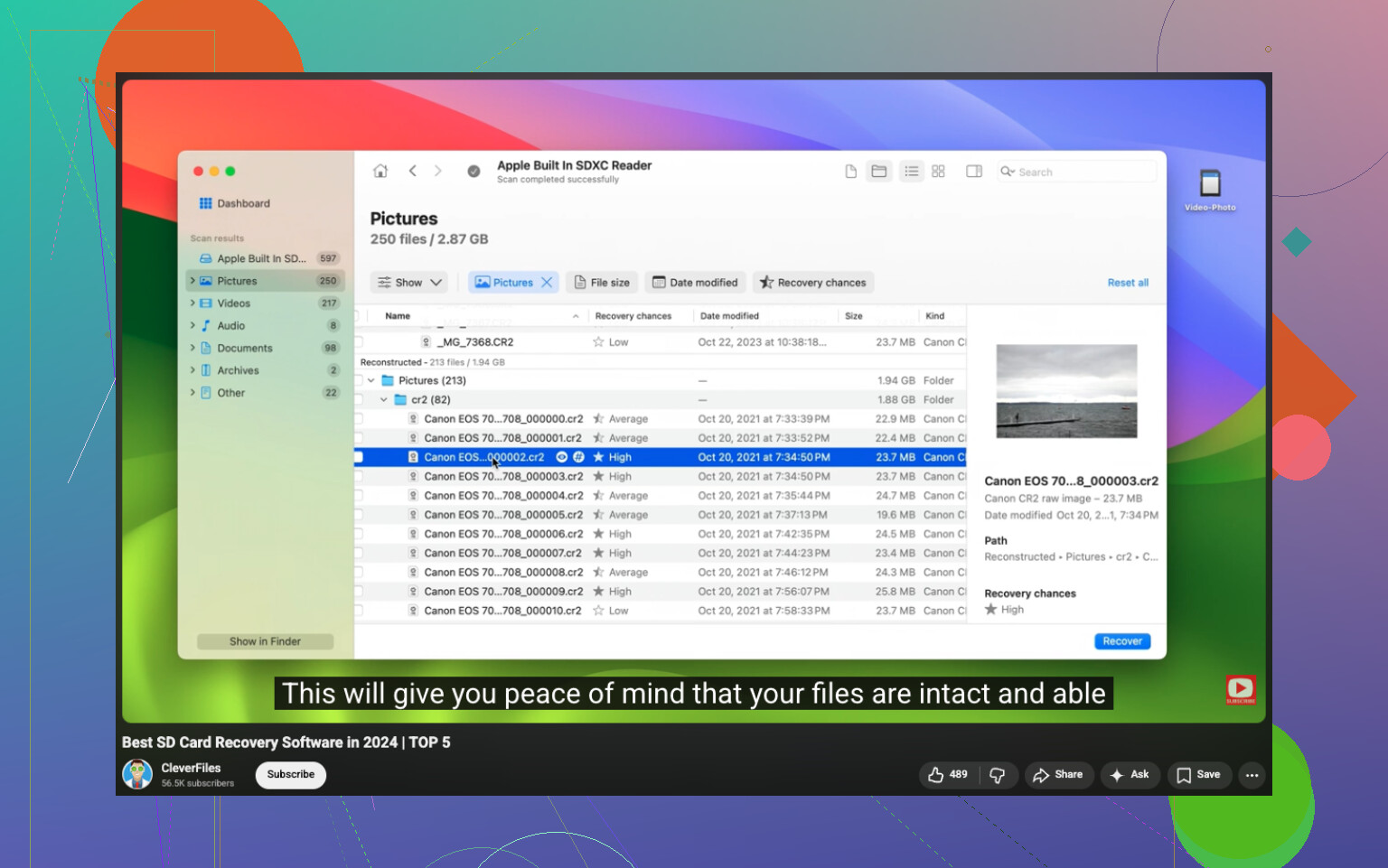
Yes, you can sometimes recover deleted Canon photos without a backup, but I’m gonna mildly disagree with the “just scan it right away” approach from @mikeappsreviewer and even a bit with @sternenwanderer. If these pics are truly irreplaceable, the safest move is not to keep poking at the card over and over with different apps.
What I’d check first, before recovery software:
- Did your Canon have dual card slots and save duplicates?
- Did you ever transfer the files with Canon EOS Utility and forget about an import folder?
- If you shot RAW+JPEG, one version may still exist even if the other looks gone.
- Some recovery failures are just preview issues. The file may recover fine even if the thumbnail looks busted.
Also, don’t put the SD card back in the camera to “see if they’re still there.” Cameras love writing tiny bits of data when you least want them to.
If you do go DIY, Disk Drill is a reasonable option for Canon SD card photo recovery because it can identify CR2, CR3, and JPG by signature, not just file table entries. That matters when filenames are gone or the folder structure is trashed. Recover to your computer or another drive only. Obvious, but ppl still mess that up.
One more overlooked place: if the card was ever used in a phone, tablet, or printer, there can be cached copies or auto-import leftovers.
If recovered images come back half-gray, sliced, or with weird colors, that usually means overwriting, not “bad recovery software.” At that point, trying 9 more apps probly won’t magically fix it.
Also, for extra reading, this Facebook post on Canon photo recovery advice and real user tips is more useful than the old “Cannon photo recovery advice on Facebook” wording anyway.

I’m with @sternenwanderer and @waldgeist on the big safety point: keep that SD card out of the camera. But I’ll push back a little on the “recover everything right now” mindset. If the deletion happened because of card corruption, not just an accidental delete, recovery software can miss photos that a repair shop could still pull later. So if these are once-in-a-lifetime shots, don’t burn hours doing repeated scans with five different apps.
A practical middle ground:
- write-protect the card if it has a lock switch
- use a good card reader, not the camera USB cable
- check the card health with a tool that reads SMART or flash errors if possible
- if the card disconnects, gets hot, or reads painfully slow, stop DIY
Where I do agree with @mikeappsreviewer is that recovery is often possible if nothing overwrote the files. Canon deletions usually just clear references first.
About Disk Drill specifically:
Pros
- easy preview for JPG, CR2, CR3
- good at signature-based photo recovery
- simple interface, not much setup
Cons
- deep scans can take a while
- recovered filenames/folders may be a mess
- if the card is physically failing, software won’t solve that
If you try Disk Drill, recover only the best previews first, not every found fragment. That saves time and helps you judge whether the card is worth a full scan. If previews are broken in a consistent way, I’d stop there and consider pro recovery instead.